.png)
Smart robot mowers have become increasingly popular in homes and farms worldwide over the past few years—they truly save time and effort. But there’s one thing that makes a lot of users uneasy: these machines aren’t cheap, and what if someone just walks off with one from the yard?
That’s why GPS anti-theft tracking has become a key feature for many buyers. Today, let’s talk about whether this feature is actually useful, how to set it up, and in which scenarios it really makes a difference.
Is GPS Anti-Theft Actually Useful? Honestly, It Depends
Let me start with some straight talk: GPS anti-theft is not a magic bullet. Its core function is location and tracking, not preventing theft in the first place. If a determined thief knows what they’re doing, they can rip out the GPS antenna or move the mower into a metal van that blocks the signal, and you’re out of luck.
But in many real-world situations, it genuinely helps:
- A neighbor’s kid pulls a prank and moves the mower—you can pinpoint it in their yard and go get it back.
- The mower strays beyond the boundary and gets stuck by the roadside—you can see its last known location on the app and go retrieve it.
- While professional thieves might disable the antenna, most opportunistic snatch-and-grab types don’t think that fast. By the time they realize there’s GPS on board, you’re already at their door.
- For farm operations with large acreage, the mower might wander through hundreds of acres and occasionally get lost in tall grass or blocked by obstacles. GPS tells you exactly which zone it’s in.
So here’s my take: GPS anti-theft isn’t a vault, but it’s the cheapest recovery tool you can buy. A few bucks for the hardware, compared to a machine that costs hundreds or thousands—it’s worth having.
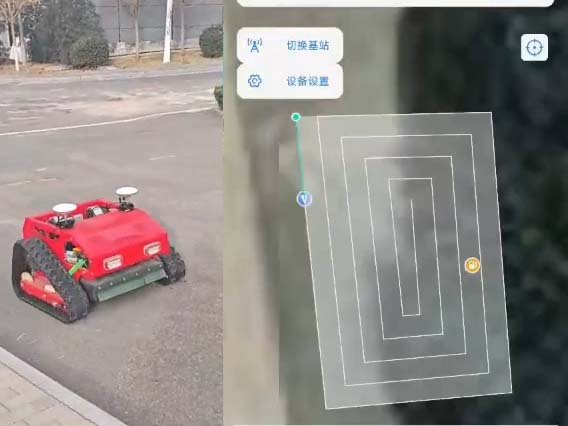
How to Set Up GPS: Step by Step
The setup interface varies between brands, but the overall logic is similar. Here’s the most common setup process:
Step 1: Insert the SIM Card or Activate
Most robot mowers require an IoT SIM card to transmit location data. The card slot is usually on the side of the chassis or near the battery compartment—just insert the card. For models with built-in eSIM, you’ll need to scan the QR code on the machine through the app to activate the device.
Note: Choose an IoT SIM card that supports 2G or 4G networks. Regular phone SIMs work too, but they’re not cost-effective. Also confirm that the network bands match your region—especially for machines exported to Europe or the US, check local carrier compatibility in advance.
Step 2: Download the App and Pair the Mower
Scan the QR code in the manual to download the corresponding mobile app, create an account, and add the device. Usually, you’ll pair via Bluetooth first, then enter your home WiFi credentials to get the mower online. Once connected, the app will show “Device Online.”
Step 3: Set Up the Electronic Fence (Geo-fence)
This is the most practical GPS setting. On the app’s map, use your finger to draw a perimeter—this circle defines the mower’s legal working area plus the yard where the charging station sits.
If the mower leaves this geo-fence, the app will push an alert to your phone. You can adjust the alert sensitivity in settings—I recommend setting it to “alert immediately upon exiting the fence” for maximum security.
Step 4: Enable Historical Track Recording
I suggest turning on track recording in the app settings. Even if the mower isn’t stolen, you can review its daily mowing paths to see if it’s missing any corners. Track data is usually saved in the cloud for 7 to 30 days.
Step 5: Test It
After completing all settings, carry the mower outside the yard to simulate a “theft scenario.” Your phone should receive an alert within a minute, and the map should show the mower’s real-time location. If you don’t get the alert, check whether the SIM card has data service enabled.
Scenarios Where GPS Is Especially Useful
Beyond anti-theft, GPS has a few hidden practical benefits:
Recovering a lost mower. Sometimes the robot gets stuck under dense shrubs or in tall grass, and you can’t see it from outside. Just open the app, check the location, walk straight to it, and pull it out—no more searching the whole yard.
Managing multiple mowers. On a farm with three or four machines working different zones simultaneously, GPS lets you see each mower’s current position and status from your phone—no need to drive around and check each one manually.
Optimizing work zones. Over time, historical track data shows you which areas the mower visits frequently and which it skips. This helps you fine-tune boundary wire placement and scheduling.
A Few Easily Overlooked Points
Signal coverage: GPS works best in open outdoor spaces. Signal weakens or disappears entirely indoors, in garages, or under metal shelters. If the charging station is inside a garage, the mower may show offline while docking—this is normal.
SIM card costs: IoT data plans usually cost a few dollars a year, and location data usage is minimal, so you don’t need to worry about overage. But some cards have expiration dates—remember to renew before they expire, or GPS will stop working.
Privacy concerns: GPS location data is uploaded to cloud servers. If your customers have privacy concerns, confirm with your supplier where data is stored and what the privacy policy is before purchasing.
No power = no location: This is critical—if a thief takes the mower and doesn’t charge it, once the battery dies, GPS stops transmitting. So if a mower goes missing, check the location immediately—don’t wait.
Summary
GPS anti-theft tracking isn’t foolproof, but it’s a highly cost-effective security layer. For farm customers, it’s more of a “fleet management tool.” For homeowners, it’s a “peace-of-mind button.”
Setup isn’t complicated—you can get it done in fifteen minutes. Spend a little time configuring it now, and save yourself the regret of a lost machine later.
If your customers haven’t enabled this feature yet, I’d suggest they set it up today. After all, nobody wants to lose an investment worth hundreds or thousands of dollars just because they didn’t take five minutes to turn on tracking.
-300x76.png)